 Canada (English)
 Colombia
 Caribbean and Puerto Rico
 Ecuador
 India
India
 Indonesia
 Ireland
 Malaysia
 Mexico
 Panama
 Peru
Peru
 Philippines
 Singapore
 South Africa
 Sri Lanka
 Thailand
 United Kingdom
 United States

Bank feeds software automatically imports and reconciles transactions from your bank, credit card, and loan accounts into your ERP or accounting system. Acumatica Bank Feeds connects securely to more than 14,000 financial institutions, giving you faster reconciliation, fewer errors, clear cash visibility, and automating transaction matching with AI and machine learning.

-
English
-
English
-
 AcumatiCares

Product
Bank Feed Software
Why Use Automated Bank Feeds for Better Accuracy and Faster Reconciliation?
Connect bank accounts and corporate cards directly to Acumatica. Automatically import transactions, match them to invoices, payments and expenses, and focus your finance team on the exceptions that need review. Acumatica offers:
- 14,000+ supported financial institutions
- Plaid and MX connectivity
- Automated transaction matching
- BAI2, BTRS and AMEX GL1025 support
- Record-level audit trails

How Can Bank Feed Software Help Your Team
-
Automate Processes
Schedule imports to occur automatically based on flexible, user-defined schedules. Smart matching eliminates reconciliation for recognized transactions.
-
Setup in Minutes
Connect to financial institutions in minutes with your corporate or personal credentials. Link financial accounts to General Ledger accounts with a few clicks.
-
Streamline Expenses
Use the software with Advanced Expense Management to automate expenses for corporate credit cards. Advanced Expense Management streamlines business expenses with flow-through to customer projects for review and customer billing. Automatically attach expense receipts to appropriate bank feeds. Automatically import bank transactions and create expense receipts based on downloaded transactions and send them for approval.
-
Integrate with Thousands of Financial Institutions*
Use the Bank Feeds option to automate and schedule imports by storing a secure token. Use the Bank Import option to download and import files from bank websites.
*Bank Feeds supports popular banks. Bank Imports may be needed for less common institutions.
Important Features of Bank Feed Software
Bank Integration
The software utilizes industry-leading aggregators, Plaid and MX, to retrieve and format transactions from more than 14,000 financial institutions. This supports consistent imports across multiple bank accounts and helps teams work with current banking activity in one place.
Secure Connections
Multi-Factor Authentication (MFA), Advanced Encryption Standard (AES 256), and Transport Layer Security (TLS) ensures safety and security for all information exchanges.
Transaction Matching
Automatically match one bank transaction to one or more payments, invoices, receipts, credit memos, and debt adjustments by using default settings, artificial intelligence, and machine learning. This helps reduce manual entry and improves reconciliation speed.
Manage by Exception
Unmatched transactions are conveniently displayed in dashboard views for review and manual matching or categorization in Acumatica. Write-offs of AR balances and credits are supported.
Audit Logs
Bank feed updates are logged at the record and field level in Acumatica, providing traceability for all financial data transactions.
Flexible Imports and Mapping
Advanced mapping and custom data provider connections provide flexibility to automate virtually any business scenario.
Payment Validation and Refund Processing
Request validation status updates for pending credit card transactions through predefined synchronization schedules. Dynamically create refund transactions from imported bank receipts that match vendor debit adjustments and automatically record external reference numbers in the payment reference field.
Dynamic Refunds of Debit Adjustments
Dynamically create refund transactions from imported bank receipts that match to vendor debit adjustments and automatically record external reference numbers from the bank receipt in the payment ref field of the refund document.
BAI2 and BTRS File Formats
Users can process BAI2 and BTRS bank feed file formats, enabling automatic processing of bank transactions, including corporate credit card receipts for employees specified in the bank feed settings.
AMEX GL1025 Files Formats
Automate the import of American Express corporate card transactions by using the GL1025 file format with bank feeds. This integration streamlines expense processing by reducing manual data entry and helping you efficiently manage a high volume of employee expenses.
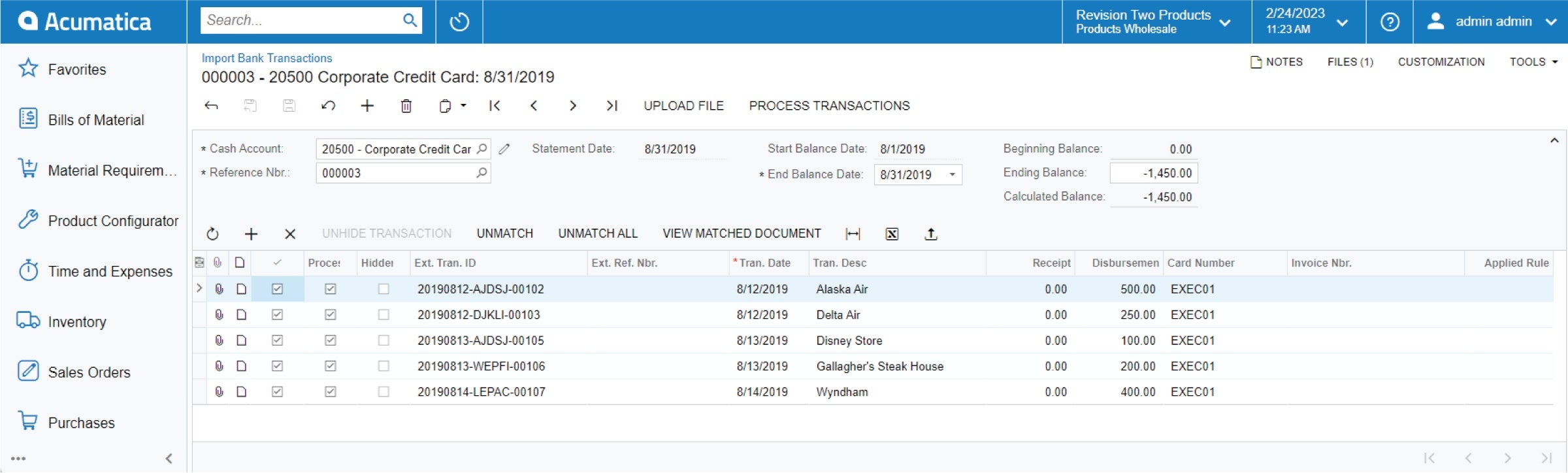
Automate bank feed transactions on a configurable schedule or import data manually with secure data synchronization
Bank Feed Software - FAQs
What are bank feeds?
Bank feeds are secure connections that bring transaction data from savings, checking, loan, investment, and corporate credit card accounts into accounting or ERP software. In Acumatica, bank feeds help businesses automate imports, reduce manual data entry, and improve reconciliation workflows across connected bank accounts.
What are the benefits of Bank Feeds Software?
With bank feeds software, businesses enjoy a number of benefits, including:
- Automatic imports based on user-defined schedules.
- Automated, intelligent reconciliation for recognized transactions and anomaly detection.
- Quick and secure connection to thousands of financial institutions.
- Ability to link financial accounts to General Ledger accounts with a few clicks.
- Reduced month-end close times.
- Access to real-time data for informed decision making.
And businesses can anticipate immense time savings and a reduction in human-based errors by eliminating manual data entry.
“I save about a quarter of my time by not having to do manual reconciliations for all the closings.” – Stacy Troiano, Controller, Seaport Capital
How Acumatica Bank Feeds Software works?
- Connect Accounts Securely – Connect checking, savings, credit card, loan and investment accounts through Plaid or MX.
- Schedule transaction imports – Set different synchronization schedules for each bank or account.
- Automatically match transactions – Match imported transactions to payments, invoices, receipts, credit memos, expenses and adjustments.
- Review exceptions – Use dashboards to identify unmatched transactions, discrepancies and items requiring categorization.
- Post with a complete audit trail – Retain record- and field-level history for reconciliation activity and financial controls.
How Does Acumatica Bank Feeds Compare to Bank Import and Manual Reconciliation?
Acumatica Bank Feeds pulls transactions automatically through a secure, live connection to your financial institution, then matches that activity to your general ledger for you. Bank import, by contrast, requires you to manually download a file and upload it into the system, and manual reconciliation means comparing every line by hand.
Here is how the three approaches stack up:
- Bank Feeds vs. Bank Import: Bank Feeds keeps data flowing continuously, so you skip the gaps and delays of one-off file uploads.
- Bank Feeds vs. Manual Reconciliation: Bank Feeds automates general ledger matching, replacing tedious line-by-line comparison. Manual reconciliation still works for very low volumes, but Bank Feeds scales with your business and cuts the risk of human error as transaction counts grow.
- Supported institutions: Bank Feeds connects to more than 14,000 financial institutions across banks, credit unions, and credit card providers through trusted aggregators like Plaid and MX. If your institution supports secure data sharing, you can likely link it and start pulling transactions right away.
| Feature | Acumatica Bank Feeds | Bank Import | Manual Reconciliation |
|---|---|---|---|
|
Data Collection |
Automatic, live connection | Manual file download and upload | Manual entry |
|
Update frequency |
Near real time | Per file upload | On demand |
|
General ledger matching |
Automated | Partially automated | Fully manual |
|
Error Risk |
Low | Moderate | High |
|
Best for |
Growing transaction volumes | Occasional imports | Very low volumes |
See what Acumatica customers are saying


Acumatica UK Ltd. is an agent of Plaid Financial Ltd., an authorized payment institution regulated by the Financial Conduct Authority under the Payment Services Regulations 2017 (Firm Reference Number: 804718). Plaid provides users in the United Kingdom with regulated account information services through Acumatica as its agent.